HOST
required value
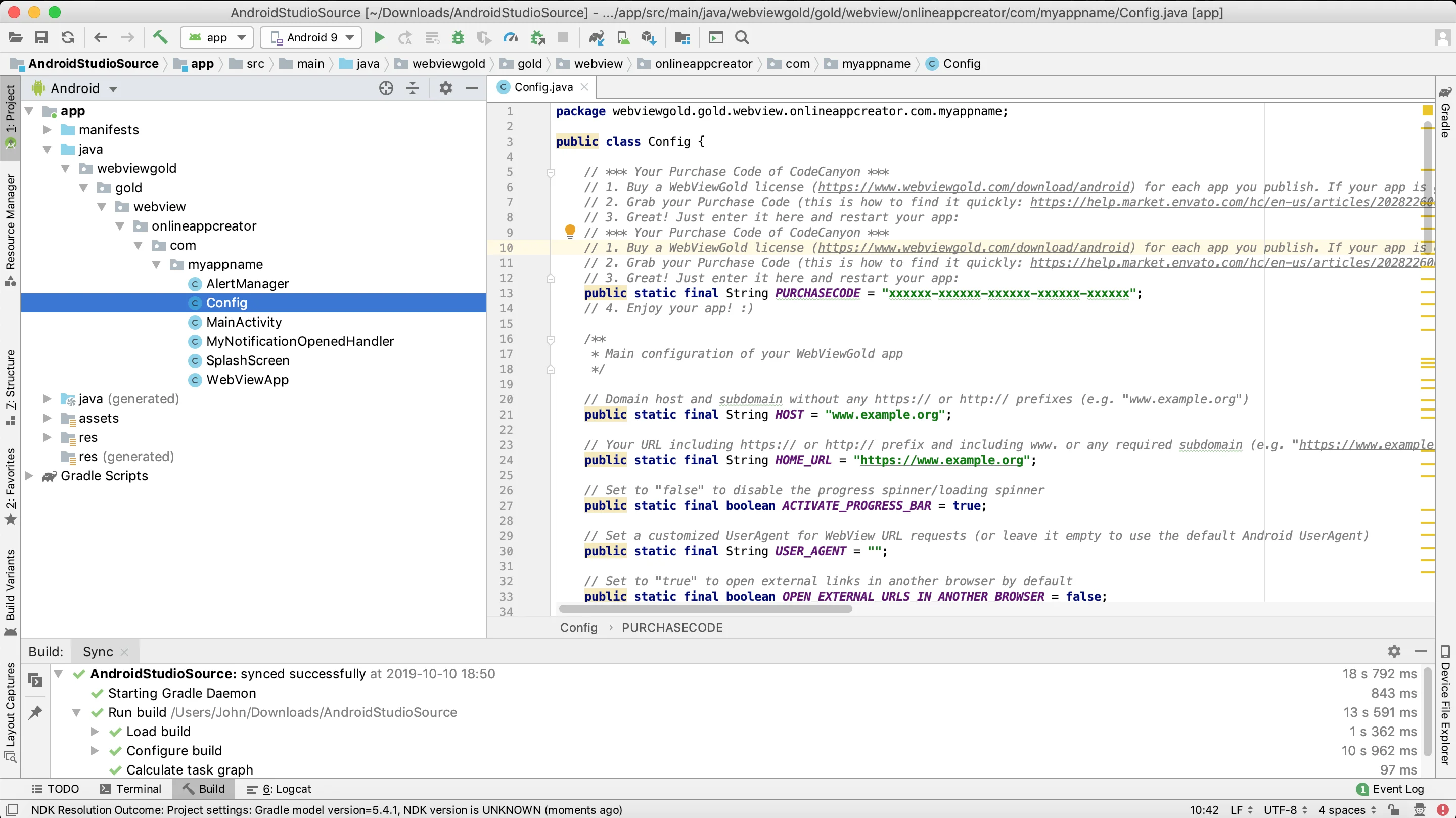
Your domain host without https:// or http:// prefix (e.g. "www.example.org"). By default, WebViewGold for Android permits both HTTPS content and HTTP content. However, if you prefer to enhance app security by enabling only HTTPS content, there's an option to
modify this setting (and/or consider 'BLOCK_SELF_SIGNED_AND_FAULTY_SSL_CERTS' option).
HOME_URL
required value
Your full WebView URL (e.g. "https://www.example.org/app.html") which should be loaded in the WebView. By default, WebViewGold for Android permits both HTTPS content and HTTP content. However, if you prefer to enhance app security by enabling only HTTPS content, there's an option to
modify this setting (and/or consider 'BLOCK_SELF_SIGNED_AND_FAULTY_SSL_CERTS' option).
USE_LOCAL_HTML_FOLDER
true or false
Set to true to use local "index.html" HTML file instead of remote WebView URL
FALLBACK_USE_LOCAL_HTML_FOLDER_IF_OFFLINE
true or false
Set to true if you want to use the "local-html" folder if the user is offline, and use the remote URL if the user is online
ACTIVATE_PROGRESS_BAR
true or false
Set to false to disable the progress spinner/loading spinner
PHONE_ORIENTATION
value (orientation)
Set the phone orientation to either "portrait", "landscape", or "auto"
TABLET_ORIENTATION
value (orientation)
Set the tablet orientation to either "portrait", "landscape", or "auto"
USER_AGENT
optional
Define a customized UserAgent for web requests (or leave it empty to use the default Android UserAgent)
HARDWARE_ACCELERATION
true or false
Set to true to activate Hardware Acceleration; it can improve rendering performance but can also increase memory usage and may cause compatibility issues with some content
APPEND_LANG_CODE
true or false
Set to true if you want to extend URL request by the system language like ?webview_language=LANGUAGE CODE (e.g., ?webview_language=EN for English users)
AUTO_REFRESH_ENABLED
true or false
Set to true if you want the WebView to automatically refresh its contents when the app comes back to the foreground from the background.
EXTERNAL_LINK_HANDLING_OPTIONS
0 or 1 or 2
Set to (0) to open external links in-app by default; (1) to ALWAYS open in a new tab (an additional in-app browser); (2) to ALWAYS open in another browser
BROWSER_WHITELIST
List
Add domains here that should always be opened in the external browser, regardless of what the EXTERNAL_LINK_HANDLING_OPTIONS option is set to. To add another domain, insert another host as follows: ["www.alwaysopeninchrome.com", "www.google.com"]. Please enter the host exactly how you link to it (but never with the inclusion of http/https)
BROWSER_BLACKLIST
List
Add domains here that should never be opened in the external browser, regardless of what the EXTERNAL_LINK_HANDLING_OPTIONS option is set to. To add another domain, insert another host like so: ["www.neveropeninchrome.com", "www.google.com"]. Please enter the host exactly how you link to it (but never with the inclusion of http/https)
SPECIAL_LINK_HANDLING_OPTIONS
0 or 1 or 2
Set to (0) to open special links in-app; (1) in a new tab (an additional in-app browser); (2) in another browser; NOTE: Special links have a "_blank" target or end with "#"; Overrides EXTERNAL_LINK_HANDLING_OPTIONS if the link is also an external link
ALWAYS_OPEN_IN_INAPP_TAB
list
Add URL prefixes that you ALWAYS want to open in an in-app tab (e.g., {"https://www.google.com", "https://www.example.com/page"}), regardless of what the EXTERNAL_LINK_HANDLING_OPTIONS is set to.
NEVER_OPEN_IN_INAPP_TAB
list
Add URL prefixes that you NEVER want to open in an in-app tab (e.g., {"https://www.google.com", "https://www.example.com/page"}), regardless of what the EXTERNAL_LINK_HANDLING_OPTIONS is set to.
QR_CODE_URL_OPTIONS
0 or 1 or 2 or 3 or 4
Set to (0) to open a scanned QR code URL in the app; (1) in an in-app tab; (2) in a new browser; (3) in an in-app tab if external; (4) in a new browser if external
AUTO_INJECT_VARIABLES
true or false
Set to true in order to automatically set JavaScript variables; will eliminate the need to manually call methods like get-uuid://: currently, it supports loading the app version, OneSignal and Firebase subscription IDs, as well as the UUID
CLEAR_CACHE_ON_STARTUP
true or false
Set to true to clear the WebView cache & cookies on each app startup and do not use cached versions of your web app/website
CLEAR_CACHE_ON_EXIT
true or false
Set to true to clear WebView cache & cookies upon full app exit (you might also want to activate CLEAR_CACHE_ON_STARTUP, as system differences could affect reliability)
COOKIE_ON_LAUNCH
true or false
Set to true to add a custom cookie to the WebView when the app is launched
COOKIE_ON_LAUNCH_NAME
text value
Customize the name of the cookie added on launch (requires COOKIE_ON_LAUNCH to be set to true)
COOKIE_ON_LAUNCH_VALUE
text value
Customize the value of the cookie added on launch (requires COOKIE_ON_LAUNCH to be set to true)
COOKIE_ON_LAUNCH_IS_SECURE
true or false
Set to true to mark the launch cookie as secure (HTTPS only)
IS_DEEP_LINKING_ENABLED
true or false
Set to true to enable deep-linking
IS_CUSTOM_SCHEME_ENABLED
true or false
Set to true if you want to accepts custom scheme deeplinks like webviewgold://
CUSTOM_DEEPLINK_SCHEME
true or false
Customize deeplinking scheme prefix here and also in AndroidManifest.xml
OPEN_NOTIFICATION_URLS_IN_SYSTEM_BROWSER
true or false
Set to true to open the notification deep linking URLs in the system browser instead of your app
SPLASH_SCREEN_ACTIVATED
true or false
Set to true to activate the splash screen
SPLASH_TIMEOUT
number value (milliseconds)
Set the splash screen timeout in milliseconds (the loading sign screen will show after this time duration if the home URL still has some loading to do)
SPLASH_FADE_OUT
number value (milliseconds)
Duration of the splash screen fade-out animation in milliseconds. This animation begins after all other delay timers have completed. Set to 0 to disable the fade-out effect.
SPLASH_MIN_TIME
number value (milliseconds)
Minimum duration (in ms) the splash screen will be shown, used only if REMAIN_SPLASH_OPTION is set to true; if SPLASH_MIN_TIME exceeds this value, the splash screen will remain for SPLASH_MIN_TIME instead. In such cases, this value will be ignored in favor of the longer duration.
REMAIN_SPLASH_OPTION
true or false
Set to true to show the splash screen until the home URL has finished loading (overrides SPLASH_TIMEOUT)
SCALE_SPLASH_IMAGE
percentage value [0-100]
Set the splash screen image size with respect to the device's smallest width/height; range in percentage [0-100]; Caution: value = 0 will hide the image completely
blackStatusBarText
true or false
Set to true for black status bar text; Set to false for white status bar text; Use 'colorPrimaryDark' in style.xml to choose the status bar background color
TRANSPARENT_STATUS_BAR
true or false
Set to true for transparent status bar; Set to false for opaque status bar; Use 'colorPrimaryDark' in style.xml to choose the status bar background color
enableBioMetricAuth
true or false
Set to true to enable App Lock (biometric authentication) for the app
PREVENT_SLEEP
true or false
Set to true to prevent the device from going into sleep while the app is active
ENABLE_SWIPE_NAVIGATE
true or false
Set to true to enable navigation by swiping left or right to move back or forward a page
ENABLE_PULL_REFRESH
true or false
Set to true to enable swiping down to refresh the page. Additionally, you can always call enablepulltorefresh:// or disablepulltorefresh:// from your website to activate or deactivate pull-to-refresh dynamically.
HIDE_VERTICAL_SCROLLBAR
true or false
Set to true to hide the vertical scrollbar
HIDE_HORIZONTAL_SCROLLBAR
true or false
Set to true to hide the horizontal scrollbar
ENABLE_ZOOM
true or false
Set to false to prevent zoom functionalities for the app user (works by additionally using script injection)
DISABLE_DARK_MODE
true or false
Set to true to disable dark mode (not working on all launchers)
HIDE_NAVIGATION_BAR_IN_LANDSCAPE
true or false
Set to true to hide the navigation bar when in landscape mode
MAX_TEXT_ZOOM
number value
Set to a value greater than 0 to define a maximum text zoom; Set to (0) to disable this feature.
Note: Small = 85, Default = 100, Large = 115, Largest = 130
INPUT_SCROLL_HELPER
true or false
Set to true to enforce (JS-injected) consistent input field scrolling
EXIT_APP_BY_BACK_BUTTON_ALWAYS
true or false
Set to true to close the app by pressing the hardware back button (instead of going back to the last page)
EXIT_APP_BY_BACK_BUTTON_HOMEPAGE
true or false
Set to true to close the app by pressing the hardware back button if the user is on the home page (which does not allow going to a prior page)
EXIT_APP_DIALOG
true or false
Set to true to ask the user if they want to exit before exiting the app
OFFLINE_SCREEN_BACKGROUND_COLOR
hex color code
Set the color of the offline screen background using the Hex Color Code (e.g., "#ffffff" = White)
PREVENT_SCREEN_CAPTURE
true or false
Set to true to prevent users from taking screenshots or screen recordings in the app. onScreenCaptureAttempt() will be called for handling (e.g, showing an individual modal) in web app.
UUID_ENHANCE_WEBVIEW_URL
true or false
Set to true to add the UUID parameter 'uuid=XYZ' to the first URL request
BLOCK_SELF_SIGNED_AND_FAULTY_SSL_CERTS
true or false
Set to
true to block content signed with self-signed SSL (user) certificates & faulty SSL certificates; maybe also consider
blocking all Non-HTTPS content
BLOCK_ROOTED_DEVICES
true or false
Set to true to enable the app's functionality to detect rooted devices and disable itself on them (Note: Root detection is not always reliable and may not work on all devices)
LINK_DRAG_AND_DROP
true or false
Set to false to disable link drag and drop
LANDSCAPE_FULLSCREEN_VIDEO
true or false
Set to true to always present fullscreen videos in landscape mode
SHOW_FIRSTRUN_DIALOG
true or false
Set to false to disable the First Run Dialog
SHOW_FACEBOOK_DIALOG
true or false
Set to false to disable the Follow On Facebook Dialog
SHOW_RATE_DIALOG
true or false
Set to false to disable the Rate This App Dialog
RATE_DAYS_UNTIL_PROMPT
number value (days)
Set the minimum number of days to be passed after the application is installed before the "Rate this app" dialog is displayed
RATE_LAUNCHES_UNTIL_PROMPT
number value (launches)
Set the minimum number of application launches before the "Rate this app" dialog is displayed
FACEBOOK_DAYS_UNTIL_PROMPT
number value (days)
Set the minimum number of days to be passed after the application is installed before the "Follow on Facebook" dialog is displayed
FACEBOOK_LAUNCHES_UNTIL_PROMPT
number value (launches)
Set the minimum number of application launches before the "Rate this app" dialog is displayed
FACEBOOK_URL
value (URL)
Set the URL of your Facebook site
ALLOW_IMAGE_DOWNLOAD
true or false
Set to false to prevent the "Download images" pop-up box from appearing when long-pressing on an image
PUSH_ENABLED
true or false
Set to true to activate OneSignal Push (set OneSignal IDs in the build.gradle file)
PUSH_ENHANCE_WEBVIEW_URL
true or false
Set to
true if you want to extend WebView Main URL requests by the OneSignal subscription ID in the ?onesignal_push_id=XYZ format (alternatively and additionally, you can always request the OneSignal subscription ID by calling
getonesignalplayerid:// or even get it automatically if you turn "AUTO_INJECT_VARIABLES" to "true" in Config.java)
PUSH_RELOAD_ON_USERID
true or false
Set to true if WebView should be reloaded when the app gets a UserID from OneSignal (set the OneSignal IDs in the build.gradle file)
FIREBASE_PUSH_ENABLED
true or false
Set to true to activate Firebase Push (replace google-services.json before)
FIREBASE_PUSH_ENHANCE_WEBVIEW_URL
true or false
Set to
true if you want to extend URL request by ?firebase_push_id=XYZ (alternatively and additionally, you can always request the Firebase subscription ID by calling
getfirebaseplayerid:// or even get it automatically if you turn "AUTO_INJECT_VARIABLES" to "true" in Config.java)
PUSHWOOSH_ENABLED
true or false
Set to true to activate Pushwoosh Push (set the Pushwoosh credentials in the AndroidManifest.xml & string.xml files)
PUSHWOOSH_ENHANCE_WEBVIEW_URL
true or false
Set to true if you want to extend URL request by ?pushwoosh_id=XYZ (set the Pushwoosh credentials in the AndroidManifest.xml & string.xml files)
SHOW_ADSENSE_AD
true or false
Set to true to enable support for AdSense web ads (independent of AdMob ads)
SHOW_BANNER_AD
true or false
Set to true if you want to display AdMob banner ads (set the AdMob IDs in the strings.xml file)
SHOW_FULL_SCREEN_AD
true or false
Set to true if you want to display AdMob fullscreen interstitial ads after X website clicks (set the AdMob IDs in the strings.xml file)
SHOW_APP_OPEN_AD
true or false
Set to
true to show
AdMob app open ads on cold start (from the launcher splash) and when returning from the background (set admob_app_open_id in the strings.xml file)
ASK_FOR_AD_CONSENT
true or false
SHOW_AD_AFTER_X
value (website reloads)
Set the number X of website clicks for AdMob interstitial ads (set the AdMob IDs in the strings.xml file)
INCREMENT_WITH_TAPS
true or false
Set to true to allow normal screen taps to increment SHOW_AD_AFTER_X
USE_FACEBOOK_ADS
true or false
Set to true to use Facebook Audience Network ads instead of AdMob ads (set the Ad IDs in the strings.xml file)
ENABLE_REWARDED_ADS
true or false
Set to true to enable AdMob rewarded ads. Required to be true even for manual activation of ads.(set the Ad IDs in the strings.xml file)
USE_REWARDED_ADS_WHERE_POSSIBLE
true or false
Set to true to display admob rewarded ads instead of admob interstitial ads, i.e after x taps etc. Keep as false if their activation should be handled via your website's code. Note, this requires SHOW_FULL_SCREEN_AD to also be set to true, in order to overwrite them.
AD_TRIGGER_URLS
optional
Add page trigger words here, presence in a URL triggers interstitial ads (e.g., "thanks.html", "welcome.html", "/thank-you/", "next-step.php")
REVENUECAT_API_KEY
optional
REVENUECAT_PROJECT_ID
optional
downloadableExtension
list
Add the file formats that should trigger the file downloader functionality (e.g., .pdf, .docx, ...)
AUTO_DOWNLOAD_FILES
true or false
Set to true if you want to activate the downloader functionality based on Content-Disposition HTTP headers, regardless of the file formats listed in the downloadableExtension variable above
GOOGLE_LOGIN_HELPER_TRIGGERS
list
Define the URL prefixes that load during Google login for your website; acts as a trigger for the helper
FACEBOOK_LOGIN_HELPER_TRIGGERS
list
Define the URL prefixes that load during Facebook login for your website; acts as a trigger for the helper
HOME_URL_LOGOUT
value (URL)
Define the URL for logout to clear login cookies (optional)
MANUAL_COOKIE_SYNC
true or false
Set to
true to enable the Manual Cookie Sync tool. To be used if you require cookies to be synced
under every 30 seconds or if something cookie-related does not work otherwise. See cookie hints also
here.
COOKIE_SYNC_TIME
number value (milliseconds)
Define how often the cookies should sync with the app in milliseconds (ms)
MANUAL_COOKIE_SYNC_TRIGGERS
list
Define the URL prefixes you want to use the Manual Cookie Sync tool on. If MANUAL_COOKIE_SYNC_TRIGGERS is empty, it will automatically check every page. Example: {"https://example.com/login", "https://example.com/data"}
USE_CUSTOM_HEADERS
true or false
Set to true to inject custom HTTP headers into every URL navigation; define the header names & values in the customHeaders map directly below this option in Config.java
requireLocation
true or false
Set to
false if you do NOT require location services/GPS coordinates; don't forget to also remove relevant entries in
AndroidManifest.xml if you want to ensure the complete removal of the permission capability for the app; also see
usage of background (!) location
requireBackgroundLocation
true or false
Set to false if background location services are required.
If this option is set to false, ensure that you also uncomment the
android.permission.FOREGROUND_SERVICE_LOCATION and .GPSService
blocks in AndroidManifest.xml (search for these terms within). This setting is only effective if requireLocation is also set to true.
requireStorage
true or false
Set to false if you do NOT require APIs related to downloads or uploads; don't forget to also remove relevant entries in AndroidManifest.xml if you want to ensure the complete removal of the permission capability for the app
requireCamera
true or false
Set to false if you do NOT require APIs related to camera images / camera videos; don't forget to also remove relevant entries in AndroidManifest.xml if you want to ensure the complete removal of the permission capability for the app
requireRecordAudio
true or false
Set to false if you do NOT require APIs related to recording audio; don't forget to also remove relevant entries in AndroidManifest.xml if you want to ensure the complete removal of the permission capability for the app
filePickerMode
number value
File upload options: (0) Camera & gallery; (1) Camera only; (2) Gallery only.