Universal Links API
借助 Apple Universal Links,将指向您域名的链接直接在 iOS 应用中打开——设置、AASA 文件与故障排除。
The Universal Links API simplifies linking to content within your app, providing a more seamless and native user experience. WebViewGold enables you to configure your domain so that links from apps like Mail, Safari, and others automatically open within your WebViewGold-based app—without requiring additional prompts.
Note: the app must be installed on the user's device first for this feature to work.
Alternatively, it is possible to use our Deep Linking API. While it operates in a similar manner, it uses a different syntax. However, it's worth noting that the syntax of the Universal Links API is more common than the syntax of the Deep Linking API. For most apps, it's wise to choose either one, but not both.
To set up Universal Links in your iOS app, please follow the steps below:
- Apple Developer Center Setup:
- Log in to your account on the Apple Developer Center.
- Click on 'Certificates, Identifiers & Profiles'.
- Under 'Identifiers', select 'App IDs' and then choose your app's ID from the list.
- Under the 'App Services' section, check the 'Associated Domains' option and save your changes.
- Xcode Setup:
- Open your app project in Xcode.
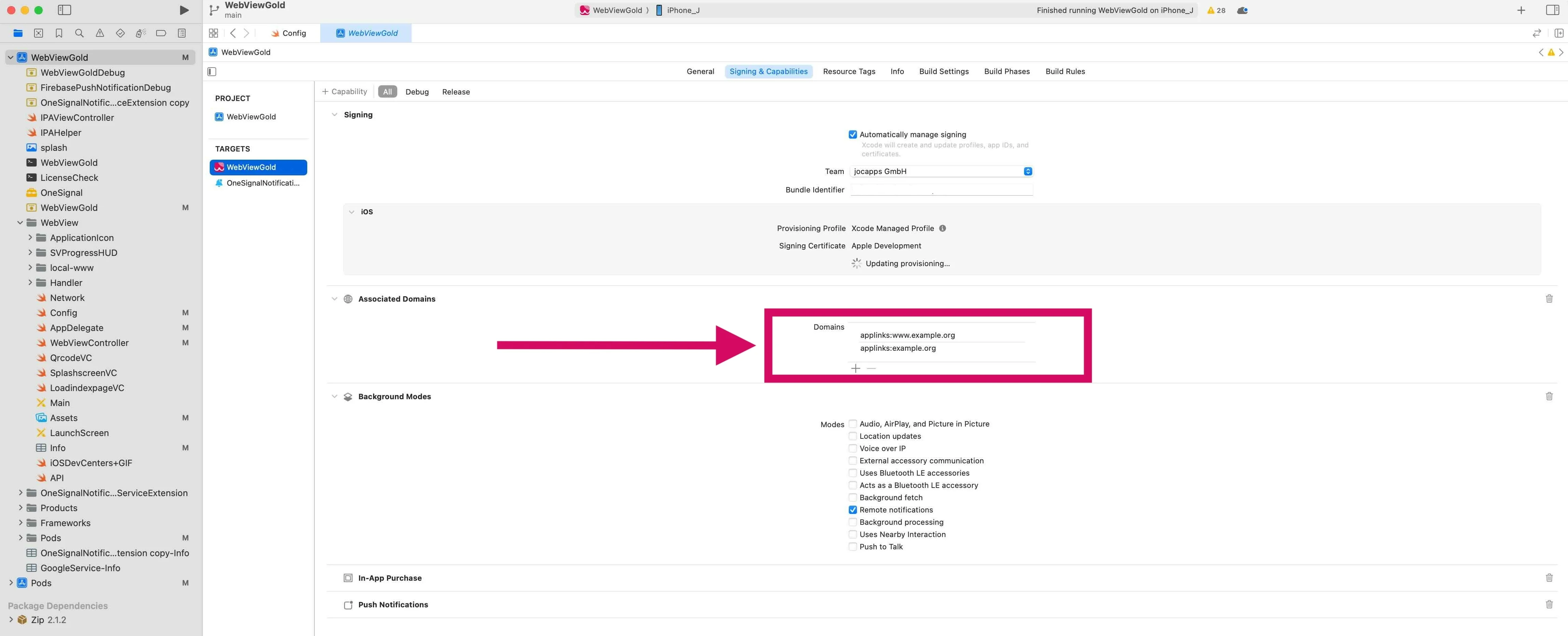
- Select the target (in most cases "WebViewGold"). In the 'Signing & Capabilities' tab, navigate to the 'Associated Domains' section. Click on '+' to add a domain. Your domain should be prefixed with 'applinks:', like this:
applinks:example.org&applinks:www.example.org:
- In Config.swift, turn ShowExternalLink to true.
- Be mindful of subdomains. There's a distinction between "www.*" and non-"www" domains (consider adding both). Ensure that you have the correct provisioning profile with the 'Associated Domains' capability. If not, Xcode should prompt you to fix it.
- Server Setup:
- On your website server, you need to host an Apple App Site Association (AASA) file at the root level of your server or using the
/.well-known/prefix. E.g.,https://example.org/.well-known/apple-app-site-association - The AASA file should contain details about the app and the associated domains. Refer to the official documentation for the exact structure. Ensure that the apple-app-site-association file is hosted on a server that supports HTTPS, not just HTTP.
Done! :-) Testing in the Simulator isn't as effective as on a real device. For best results, use an actual iPhone or iPad.
SDK 风格的实现说明
将此功能视为向 Web 层公开的原生能力:将生产网站或 PWA 作为唯一可信来源,然后使用文档中的 WebViewGold 配置标志、URL 命令和 JavaScript 桥接调用,仅在能够带来价值的地方启用原生 iOS 行为。这种方式让代码库易于维护,因为同一个 Web 应用只需极少的条件逻辑即可同时服务于浏览器、WebViewGold for iOS 以及其他 WebViewGold 平台。
为获得可靠的结果,建议优先使用 HTTPS 端点、稳定的路由名称、在界面中明确的成功/错误状态,以及封装原生调用的小型 JavaScript 辅助函数。例如,使用 jQuery Mobile、Lovable、Base44、Bolt、WordPress、Bubble、自定义 React/Vue/Angular 技术栈或静态 HTML 构建的 Web 应用,可以提供单个按钮或事件处理程序来触发原生 WebViewGold API,同时仍为浏览器提供优雅的回退方案。
- 推荐的集成模式:检测应用上下文,调用 WebViewGold API,然后在原生回调或路由变更后更新 Web 界面。
- 测试清单:在真机或打包构建上验证该功能,检查权限和商店审核文案,并确认仅使用浏览器的用户仍能获得有用的回退方案。
- SEO 优势:让功能页面、路由标题和结构化内容在您的网站上保持可被索引,同时由 WebViewGold 为 iOS 用户提供原生应用外壳。