
AdMob Ads API
Monetize your iOS app with Google AdMob banner, interstitial, and rewarded ads — configuration and JavaScript triggers.
AdMob is a Google service for monetizing mobile apps on iOS and Android platforms. It allows developers to integrate banner, interstitial, and rewarded ads, which are paid by clicks (CPC, Cost-per-Click) or impressions (CPM, Cost-per-Mille). WebViewGold simplifies AdMob integration, enabling quick setup for displaying ads in your WebView-based iOS application.
Step 1: Open Info.plist file and set your AdMob global account ID in the GADApplicationIdentifier field:
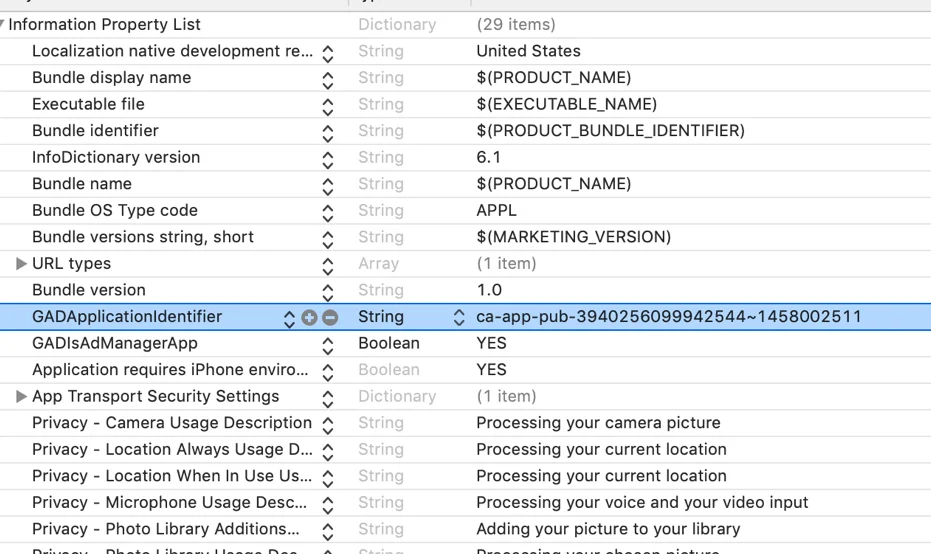
Step 2: Please insert your AdMob IDs in the Config.swift for AdmobBannerID, AdmobinterstitialID, and AdmobRewardedID:
Step 3: Within Config.swift you can:
- Enable or disable banner and/or interstitial ads by setting
showBannerAdtotruefor banner ads andshowFullScreenAdtotruefor interstitial ads. - Define intervals for displaying interstitial ads by changing
showadAfterXto the desired number of website interactions before playing an interstitial ad.
To enable rewarded ads (only available for iOS versions greater than 13.0): Set
enableRewardedAds to true.
To play a rewarded ad, use a call to our rewarded ad API functionality.
<a href="displayrewardedad://>Display Rewarded Advertisement</a>Upon completion of full viewing of an advertisement, your website will be sent a call to a JavaScript function, updateRewardedStatus('true');. This function is up to you to implement in your JavaScript code, as it is up to you to decide how you want to reward the user.
WebViewGold supports displaying rewarded ads as the default advertisement option, overwriting the interstitial options. For this to occur, set
useRewardedAdsWherePossible and showFullScreenAd to true.
Tip: If you display interstitial ads after X taps (
incrementWithTaps set to true), you can also increase the tap counter manually from your web app by calling increasetapcounter:// — useful for counting only specific interactions towards the ad interval.
For more information, please consider the official AdMob SDK documentation as well (but skip the setup parts as WebViewGold already includes the framework).