purchasecode
required value
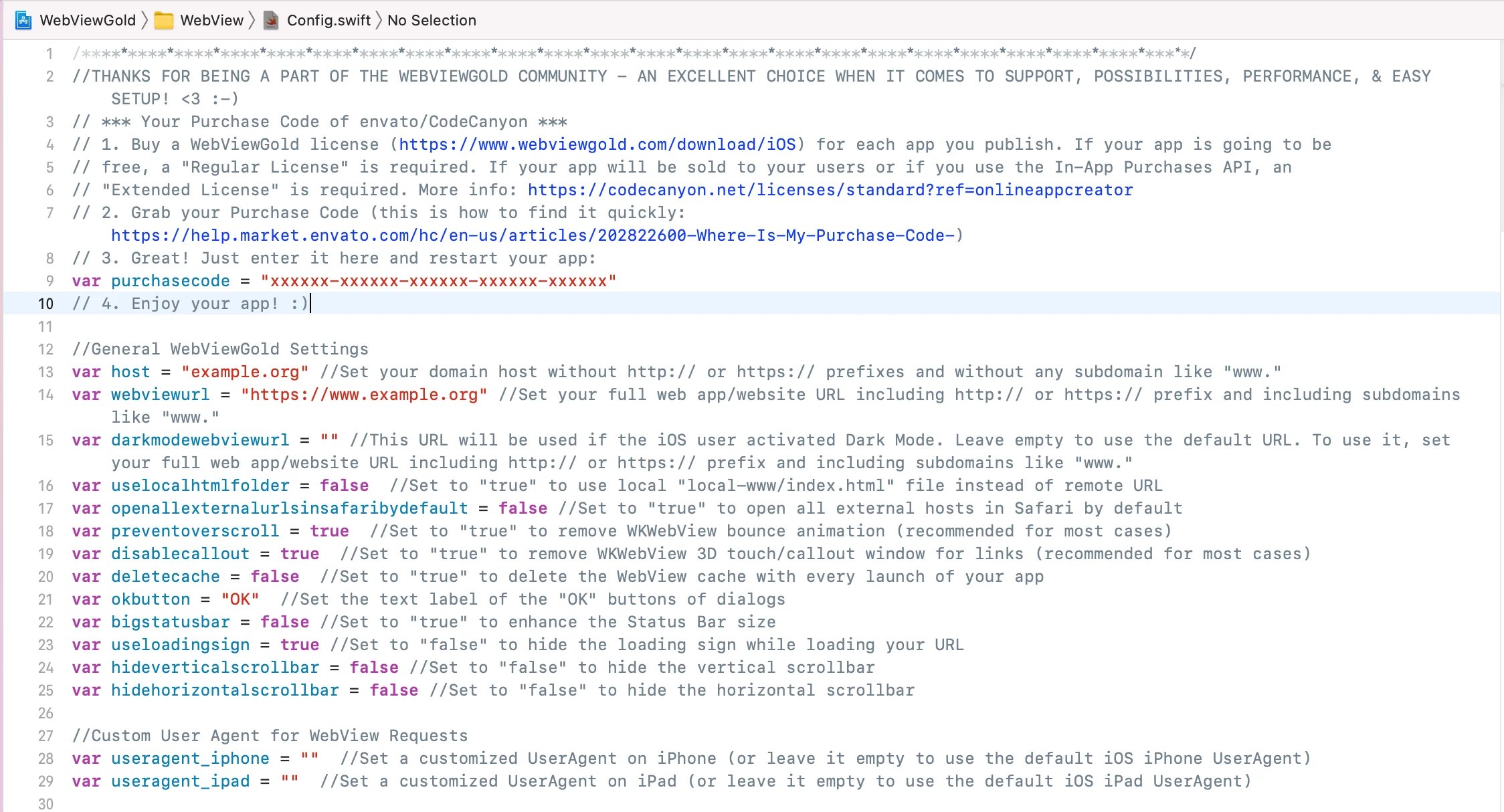
Enter your Envato/CodeCanyon Purchase Code for this app
app_admin_email
optional
Email address to receive status updates (leave default to disable)
host
required value
Your domain host (e.g., "example.org". By default, WebViewGold for iOS permits both HTTPS content and HTTP content. However, if you prefer to enhance app security by enabling only HTTPS content, there's an option to
modify this setting (and/or consider 'blockfaultyandselfsignedhttpscerts' option)
webviewurl
required value
Your full WebView URL (e.g., "example.org/app.html") which should be loaded in the WebView. By default, WebViewGold for iOS permits both HTTPS content and HTTP content. However, if you prefer to enhance app security by enabling only HTTPS content, there's an option to
modify this setting (and/or consider 'blockfaultyandselfsignedhttpscerts' option)
uselocalhtmlfolder
true or false
Set to true to use local "local-www/index.html" HTML file instead of remote WebView URL (make sure to not create or use subfolders within local-www)
externalLinkHandlingOptions
0, 1, or 2
Set to
0 to open external links in-app by default, or to
2 to ALWAYS open them in another browser (Safari); see the
URL Handling API
specialLinkHandlingOptions
0, 1, or 2
Set to 0 to open special links (e.g., target="_blank") in-app, 1 to open them in a new tab (an additional in-app browser), or 2 to open them in another browser (Safari)
safariwhitelist
List
Add domains here that should always be opened in Safari, regardless of what the externalLinkHandlingOptions option is set to; to add another domain, insert another host like so: ["alwaysopeninsafari.com", "google.com", "m.facebook.com"] please enter the host exactly how you link to it (with or without www, but always without http/https)
safariblacklist
List
Add domains here that should never be opened in Safari, regardless of what the externalLinkHandlingOptions option is set to; to add another domain, insert another host like so: ["alwaysopeninsafari.com", "google.com", "m.facebook.com"] please enter the host exactly how you link to it (with or without www, but always without http/https)
alwaysOpenInInAppTab
List
Add domains here that should always be opened in an in-app tab, regardless of what the externalLinkHandlingOptions option is set to
neverOpenInInAppTab
List
Add domains here that should never be opened in an in-app tab, regardless of what the externalLinkHandlingOptions option is set to
enableBioMetricAuth
true or false
Set to
true to enable our App Lock feature, which requires Face ID, Touch ID, or Code authentication for the app. This is an independent and additional option to our JavaScript-based
Bio Auth API
autoInjectVariable
true or false
Set to true to automatically load JavaScript variables (e.g., UUID, app version, OneSignal and Firebase subscription IDs, and App Store location) without needing to call specific URLs like get-uuid:// (this currently supports app version, OneSignal and Firebase subscription IDs, UUID, and App Store location)
disablecallout
true or false
Set to true to remove WKWebView 3D touch Link Preview/callout window for links (recommended for most cases)
deletecache
true or false
Set to true to clear the WebView cache & cookies on each app startup and do not use cached versions of your web app/website
deletecacheonexit
true or false
Set to true to clear WebView cache & cookies upon full app exit (you might also want to activate deletecache, as iOS version differences could affect reliability)
okbutton
optional
Set the text label of the "OK" buttons (translatable via alternatelanguage1/alternatelanguage2)
cancelbutton
optional
Set the text label of the "Cancel" buttons (translatable via alternatelanguage1/alternatelanguage2)
bigstatusbar
true or false
Set to true to enhance the Status Bar size
hideverticalscrollbar
true or false
Set to true to hide the vertical scrollbar
hidehorizontalscrollbar
true or false
Set to true to hide the horizontal scrollbar
enableswipenavigation
true or false
Set to false to prevent swipe left/right from triggering backward/forward navigation
orientationiphone
"portrait", "landscape" or "auto"
Set the orientation to either portrait, landscape, or auto on iPhone
orientationipad
"portrait", "landscape" or "auto"
Set the orientation to either portrait, landscape, or auto on iPad
preventsleep
true or false
Set to true to prevent the device from going into sleep while the app is active
preventZoom
true or false
Set to true to disable user zoom by injecting code that prevents zooming on the website
preventoverscroll
true or false
Set to true to remove WKWebView bounce animation (recommended for most cases). Set to false if using pull to refresh.
enhanceUrlUUID
true or false
Set to true to add the UUID parameter 'uuid=XYZ' to the first URL request
linkDragAndDrop
true or false
Set to false to disable link drag and drop
useShortcuts
true or false
Set to true to register dynamic shortcuts defined in Shortcuts.json
pulltorefresh
true or false
Set to true to enable pull to refresh in your app. Note that to enable this feature, preventoverscroll needs to be set to false. Additionally, you can always call enablepulltorefresh:// or disablepulltorefresh:// from your website to activate or deactivate pull-to-refresh dynamically.
pulltorefresh_loadingsigncolour_lightmode
Color
Set the colour of the pull to refresh loading sign in light mode
pulltorefresh_backgroundcolour_lightmode
Color
Set the colour of the pull to refresh background in light mode
pulltorefresh_loadingsigncolour_darkmode
Color
Set the colour of the pull to refresh loading sign in dark mode; requires iOS 13 or higher
pulltorefresh_backgroundcolour_darkmode
Color
Set the colour of the pull to refresh background in dark mode; requires iOS 13 or higher
useragent_iphone
optional
Define a customized UserAgent on iPhone (or leave it empty to use the default iOS UserAgent)
useragent_ipad
optional
Define a customized UserAgent on iPad (or leave it empty to use the default iOS UserAgent)
google_login_helper_triggers
optional
Define the URL prefixes that load during Google login for your website; acts as a trigger for the helper; Example: ["https://accounts.google.com", "https://accounts.youtube.com"]
facebook_login_helper_triggers
optional
Define the URL prefixes that load during Facebook login for your website; acts as a trigger for the helper; Example: ["https://www.facebook.com", "https://m.facebook.com"]
activatefirstrundialog
true or false
Set to true to activate the "First run" dialog
firstrunmessagetitle
optional
Set the title label of the "First run" dialog (if you like, you have the ability to translate this string into two additional languages using the 'alternatelanguage1' and 'alternatelanguage2' strings found at the end of Config.swift file)
firstrunmessage
optional
Set the message of the "First run" dialog (if you like, you have the ability to translate this string into two additional languages using the 'alternatelanguage1' and 'alternatelanguage2' strings found at the end of Config.swift file)
askforpushpermissionatfirstrun
true or false
Set to true to ask your users for push notifications permission at the first run of your application. Set it to "false" to never ask or to ask with a registerpush:// link/button/redirection in your web app later
offlinetitle
optional
Set the title label of the Offline dialog (if you like, you have the ability to translate this string into two additional languages using the 'alternatelanguage1' and 'alternatelanguage2' strings found at the end of Config.swift file)
offlinemsg
optional
Set the text of the Offline dialog (if you like, you have the ability to translate this string into two additional languages using the 'alternatelanguage1' and 'alternatelanguage2' strings found at the end of Config.swift file)
screen1
optional
Set the text label 1 of the Offline screen (if you like, you have the ability to translate this string into two additional languages using the 'alternatelanguage1' and 'alternatelanguage2' strings found at the end of Config.swift file)
screen2
optional
Set the text label 2 of the Offline screen (if you like, you have the ability to translate this string into two additional languages using the 'alternatelanguage1' and 'alternatelanguage2' strings found at the end of Config.swift file)
offlinebuttontext
optional
Set the text label of the Try again button (if you like, you have the ability to translate this string into two additional languages using the 'alternatelanguage1' and 'alternatelanguage2' strings found at the end of Config.swift file)
offlinescreenautoretry
true or false
Set to true if app should automatically retry to connect every second (even without button tap)
activateratemyappdialog
true or false
Set to true to activate the "Rate this app on App Store" dialog
activatefacebookfriendsdialog
true or false
Set to true to activate the "Follow on Facebook" dialog
becomefacebookfriendstitle
optional
Set the title label of the "Follow on Facebook" dialog (if you like, you have the ability to translate this string into two additional languages using the 'alternatelanguage1' and 'alternatelanguage2' strings found at the end of Config.swift file)
becomefacebookfriendstext
optional
Set the text label of the "Follow on Facebook" dialog (if you like, you have the ability to translate this string into two additional languages using the 'alternatelanguage1' and 'alternatelanguage2' strings found at the end of Config.swift file)
becomefacebookfriendsyes
optional
Set the text label of the "Yes" button of the "Follow on Facebook" dialog (if you like, you have the ability to translate this string into two additional languages using the 'alternatelanguage1' and 'alternatelanguage2' strings found at the end of Config.swift file)
becomefacebookfriendsno
optional
Set the text label of the "No" button of the "Follow on Facebook" dialog (if you like, you have the ability to translate this string into two additional languages using the 'alternatelanguage1' and 'alternatelanguage2' strings found at the end of Config.swift file)
becomefacebookfriendsurl
optional
Set the URL of your Facebook/Instagram/YouTube/... page (e.g., "https://facebook.com/OnlineAppCreator/")
imagedownloadedtitle
optional
Set the title label of the "Image saved to your photo gallery" dialog box (if you like, you have the ability to translate this string into two additional languages using the 'alternatelanguage1' and 'alternatelanguage2' strings found at the end of Config.swift file)
imagenotfound
optional
Set the title label of the "Image was not found" dialog box (if you like, you have the ability to translate this string into two additional languages using the 'alternatelanguage1' and 'alternatelanguage2' strings found at the end of Config.swift file)
transparentStatusBar
true or false
Set to true to make the status bar transparent, allowing web content to render behind it
autoAdjustSafeAreaInsets
true or false
Set to false if your website already handles safe area insets (use with transparentStatusBar)
statusBarBackgroundColor
Color
Define a custom status bar background color
darkModeStatusBarBackgroundColor
Color
Define a custom status bar background color while user is using iOS Dark Mode
statusBarTextColor
white or black
Define the text color of the status bar
darkModeStatusBarTextColor
white or black
Define the text color of the status bar while user is using iOS Dark Mode
showNavFooter
true or false
Set to true to enable the native navigation footer bar (configured via FooterBar.json)
bottombar
true or false
Set to true to enable the bottombar to prevent the home bar (found in iOS devices with no home button, eg. iPhone X) from overlapping app content
iPadBottombar
true or false
Set to true to ALSO enable the bottombar on iPads (which have bigger screens, so the home bar may not overlap content due to a different layout, hence the bottombar may not be needed)
bottombarBackgroundColor
Color
Define a custom bottom bar background color
darkmodeBottombarBackgroundColor
Color
Define a custom bottom bar background color while user is using iOS Dark Mode; requires iOS 13 or higher
qrcodelinks
0 or 1 or 2 or 3 or 4
Set to (0) to open a scanned QR code URL in the app; (1) in an in-app tab; (2) in a new browser; (3) in an in-app tab if external; (4) in a new browser if external; moreover, you can optionally limit the allowed QR code scanner prefixes in the "allowedQRurls" array of the SwiftQRScanner.swift file
ShowExternalLink
optional
splashScreenEnabled
optional
Set to false if you want to disable the Splash Screen while the app launches and display the Loading Sign instead
remainSplashOption
optional
Set to true if you want to display the Splash Screen until the initial loading of your homepage is complete (instead of the Loading Sign)
splashTimeout
number value (milliseconds)
Set the splash screen timeout in milliseconds (the loading sign screen will show after this time duration if the home URL still has some loading to do)
splashMinTime
number value (milliseconds)
Minimum time (in milliseconds) the splash screen should be displayed; set to 0 to disable the minimum duration
splashFadeTime
number value (milliseconds)
Duration (in milliseconds) of the splash screen fade-out animation; set to 0 to disable the fade-out
scaleSplashImage
percentage value [0-100]
Set the splash screen image size with respect to the device's smallest width/height; range in percentage [0-100]; value = 0 will hide the image completely, value = 100 will display the image in full-screen mode
useLoadingSign
true or false
Set to false to hide the loading sign while loading your URL
useLoadingProgressBar
true or false
Set to true to use the loading progress bar while loading your URL (instead of the loading sign)
loadingIndicatorColor
Color
Set a color for the loading indicator
alternativeAppIconNames
List
Edit this list to change the file names of your alternative app icons
backgroundlocation
true or false
Set to true to allow background location access (additionally, ensure "Background Modes" capability in the Xcode project settings includes "Location updates". Additionally, depending on your web app, you may need to activate “Background Processing” (in this case, also add an array to your Info.plist file with the key “Permitted background task scheduler identifiers" – under this array, include a string with your app bundle ID, e.g., "com.onlineappcreator.webviewgold")
appendlanguage
true or false
Set to true if you want to extend URL request by the system language like ?webview_language=LANGUAGE CODE (e.g., ?webview_language=EN for English users)
blockfaultyandselfsignedhttpscerts
true or false
Set to
true to block content signed with self-signed SSL (user) certificates & faulty SSL certificates; maybe also consider
blocking all Non-HTTPS content
jailbreakBlock
true or false
Set to true to block the app on jailbroken/hacked devices. Note: Detection is not foolproof but employs multiple methods to identify jailbreaks and hacks
autoRefreshEnabled
true or false
Set to true if you want the WebView to automatically refresh its contents when the app comes back to the foreground from the background.
offlinelocalhtmlswitch
true or false
Set to true if you want to use the "local-html" folder if the user is offline, and use the remote URL if the user is online..
extentionARY
List
Add the file formats that should trigger the file downloader functionality (e.g., .pdf, .docx, ...)
autodownloader
true or false
Set to true if you want to activate the downloader functionality based on Content-Disposition HTTP headers, regardless of the file formats listed in the extentionARY variable above
splashscreencolor
Color
Set a background color for the splash screen
extentionARY
List
Add the file formats that should trigger the file downloader functionality (e.g., .pdf, .docx, ...)
offlinelocalhtmlswitch
true or false
Set to true if you want to use the "local-html" folder if the user is offline, and use the remote URL if the user is online.
zipfiledownloadfromserver
true or false
Set to true to download a .zip archive from a remote URL that should be extracted and presented if the user is offline (also, please turn the variable turnofflinelocalhtmlswitch to true); the update will take place with every full restart of the app
zipfileremoteurl
URL
The. zip archive from a remote URL that should be extracted and presented if the user is offline
zipfilename
file name
The internal file name of the .zip file on the user device (recommended to not change)
zipfileextractpath
folder name
The internal folder name of the extract path on the user device (recommended to not change)
zipfileextractindexindex
file name
The file that should be opened first within the extracted .zip archive
zipfilepopuptitle
text
The title of the popup that will be displayed while downloading the .zip file (if you like, you have the ability to translate this string into two additional languages using the 'alternatelanguage1' and 'alternatelanguage2' strings found at the end of Config.swift file)
zipfilepopupmessage
text string
The message of the popup that will be displayed while downloading the .zip file (if you like, you have the ability to translate this string into two additional languages using the 'alternatelanguage1' and 'alternatelanguage2' strings found at the end of Config.swift file)
InAppPurchAppBundleIdentifier
optional
Set the Default App Identifier in order to activate In-App Purchase API for the default IAP product (details can be configured in App Store Connect)
IAPSharedSecret
optional
Set the App Secret in order to activate In-App Purchase API (more information can be found
here)
iapsuccessurl
optional
Set the Default URL that should be opened after a successful In-App Purchase/In-App Subscription through the WebView wrapper. The URL could be "https://www.example.org/thanks.php," for example, and thanks.php could set the lifetime cookie for premium content.
iapexpiredurl
optional
Set the Default URL that should be opened after an In-App Subscription through the WebView wrapper expired. The URL could be "https://www.example.org/expired.php," for example, and expired.php could remove the cookie for premium content
revenueCatAPIKey
optional
revenueCatProjectID
optional
oneSignalID
optional
Required for OneSignal push functionality
kPushEnabled
true or false
Set to true to activate the OneSignal push functionality
kPushEnhanceUrl
true or false
Set to
true if you want to extend WebView Main URL requests by the OneSignal subscription ID in the ?onesignal_push_id=XYZ format (alternatively and additionally, you can always request the OneSignal subscription ID by calling
getonesignalplayerid:// or even get it automatically if you turn "autoInjectVariable" to "true" in Config.swift)
kPushReloadOnUserId
true or false
Set to true if WebView should be reloaded after receiving the UserID from OneSignal
kPushOpenDeeplinkInBrowser
true or false
Set to true to open deeplinking URLs from OneSignal in the Safari browser instead of the main WebView; important: For sending notifications with a link from OneSignal, do NOT use 'Launch URL' instead, you must use an 'Additional Data Field', with key: url and value: the link you want to use
kFirebasePushEnabled
true or false
Set to true to connect your app to the Firebase Push Services
kFirebaseEnhanceUrl
true or false
Set to
true if you want to extend WebView Main URL requests by ?firebase_push_id=XYZ (alternatively and additionally, you can always request the OneSignal subscription ID by calling
getfirebaseplayerid:// or even get it automatically if you turn "autoInjectVariable" to "true" in Config.swift)
firebaseTopic
optional
Set a Firebase Topic to subscribe to
kPushwooshEnable
optional
Set to true to activate the Pushwoosh push functionality (set ID in Info.plist in Pushwoosh_APPID column)
kPushwooshEnhanceUrl
optional
Set to true to true if you want to extend WebView Main URL requests by ?pushwoosh_id=XYZ
showBannerAd
true or false
Set to
true if you want to show AdMob banner ads (please also set AdMob IDs in Config.swift & Info.plist, see
here)
showFullScreenAd
true or false
Set to
true if you want to show AdMob interstitial ads after X website clicks (please also set AdMob IDs in Config.swift & Info.plist, see
here)
showadAfterX
optional
Define number X to show an AdMob interstitial ads after each X (e.g., 10) website clicks or screen taps, depending on what
incrementWithTaps is set to (please also set AdMob IDs in Config.swift & Info.plist, see
here).
incrementWithTaps
true or false
Sets to true if you want to show interstitial ads after X screen taps, or false after X website redirects.
enableRewardedAds
true or false
Set to true to enable AdMob rewarded ads. Required to be true even for manual activation of ads.
useRewardedAdsWherePossible
true or false
Set to true to display Admob rewarded ads instead of admob interstitial ads, i.e after x taps etc. Keep as false if their activation should be handled via your website's code. Requires showFullScreenAd to also be set to true in order to overwrite them
admobadstriggerurls
optional
Add page trigger words here, presence in a URL triggers AdMob interstitial ads (e.g., ["see-highscore.php", "/thank-you/", "/next-step.html"])
useFacebookAds
true or false
Set to true to activate Facebook Interstitial Ads
facebookAdsID
optional
Enter your Placement ID, available when you create a property on Facebook Monetization manager, and connect an iOS app. The ID will look like this: 3937960198956424_3969441893142587
useTimedAds
true or false
Use timed ads for Facebook Ads (e.g., every 60s) as opposed to ads every X clicks
fbadstriggerurls
optional
Add page trigger words here, presence in a URL triggers a Facebook ad (e.g., ["see-highscore.php", "/thank-you/", "/next-step.html"])
showFBAdsEveryNSeconds
optional
Show a Facebook Interstitial Ad every X seconds; 120s and above is recommended
ATTDeniedShowAds
true or false
Set to false to stop showing ads entirely if the user denies the AppTrackingTransparency (ATT) permission
useAdsenseAds
true or false
Set to true to enable support for AdSense web ads (independent of AdMob ads)
askForAdConsent
true or false
showBarcodeScanner
true or false
Set to false to block website requests to turn on the Barcode Scanner using barcodescanner://
kFlashLightEnabled
true or false
Set to false to block website requests to turn on the flashlight using enableflashlight://
widgetRefreshTime
Number
Refresh interval for the widget in minutes
widgetfallbackURL
String
Fallback image URL used by the widget
preventScreenCapture
true or false
Set to true to call onScreenCaptureAttempt in your web app on screenshots or screen recordings
kVisionKitEnable
true or false
enableSidebar
true or false
Set to
true to enable a floating button which opens a
native sidebar, customizable in
Sidebar.json
showcustomrateappdialog
true or false
Set to
true to show a custom rate dialog when triggering the
rateapp:// API instead of attempting the native review call
ratemyappurl
URL
Set the App Store URL of your app, used by the custom rate dialog
cookieonlaunch
true or false
Set to true to add a cookie when the WebView is launched; configure it via the cookieonlaunchname, cookieonlaunchvalue, and cookieonlaunchissecure variables
useCustomHeaders
true or false
Set to true to send the custom HTTP headers defined in the customHeaders dictionary with every WebView request
siriEnabled
Plugin Token
Enter token to enable Siri plugin functionality
NFCEnabled
Plugin Token
Enter token to enable NFC plugin functionality
HealthKitEnabled
Plugin Token
Enter token to enable HealthKit plugin functionality
alternatelanguage1_langcode (& _alternatelanguage1_ string list)
true or false (& string list)
Set language code or leave this string empty to not use alternate language #1 strings (string list at the bottom of Config.swift file); if you want to activate this alternate language, please use the two-letter code that adheres to the ISO 639-1 language code standard (e.g., "de" for German, "fr" for French, "it" for Italian, "pt" for Portuguese, "ca" for Catalan, "es" for Spanish, …)
alternatelanguage2_langcode (& _alternatelanguage2_ string list)
true or false (& string list)
Set language code or leave this string empty to not use alternate language #2 strings (string list at the bottom of Config.swift file); if you want to activate this alternate language, please use the two-letter code that adheres to the ISO 639-1 language code standard (e.g., "de" for German, "fr" for French, "it" for Italian, "pt" for Portuguese, "ca" for Catalan, "es" for Spanish, …)