
WebViewGold Documentation · iOS
🇺🇸 English
Get WebViewGold

Modify the Safe Area Size

Adjust the safe area and enable the custom bottom bar so your web app looks perfect on iPhones with a Home bar.

The jump from iPhone 8 to iPhone X and beyond changed a lot in terms of User Interface in the mobile industry by removing the Home button and introducing the Home bar. Depending on your web app design, the lower menu bar may be positioned incorrectly on devices (overlapping content) with the Home bar due to the change in the default safe area.

The good news is that WebViewGold has a feature that allows you to turn on a bottombar and choose its color to match your app theme. Since the issue of the Home bar overlapping app content may not appear in iPads (due to the larger screen and possible different layout), there is also an option to disable the feature in iPads.

To implement this feature, use the following variables in Config.swift under the heading "Custom Bottom Bar Design". Make sure to set bottombar to true.
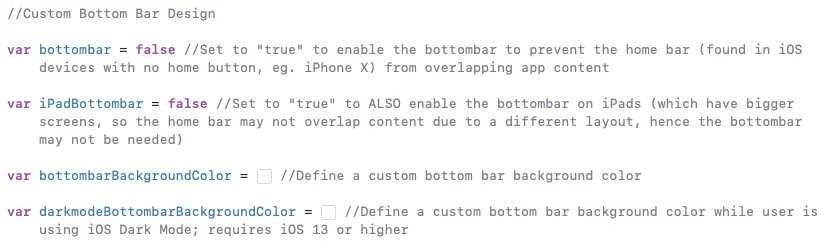
Bottom bar feature Config variables

Advanced: Instead of using the bottombar feature, you can search for this code snippet part (Press CMD+F then enter "switch UIDevice.current.userInterfaceIdiom") in the WebViewController.swift file where you can change the border value 20 to any desired value like 10, 30, etc as shown below:
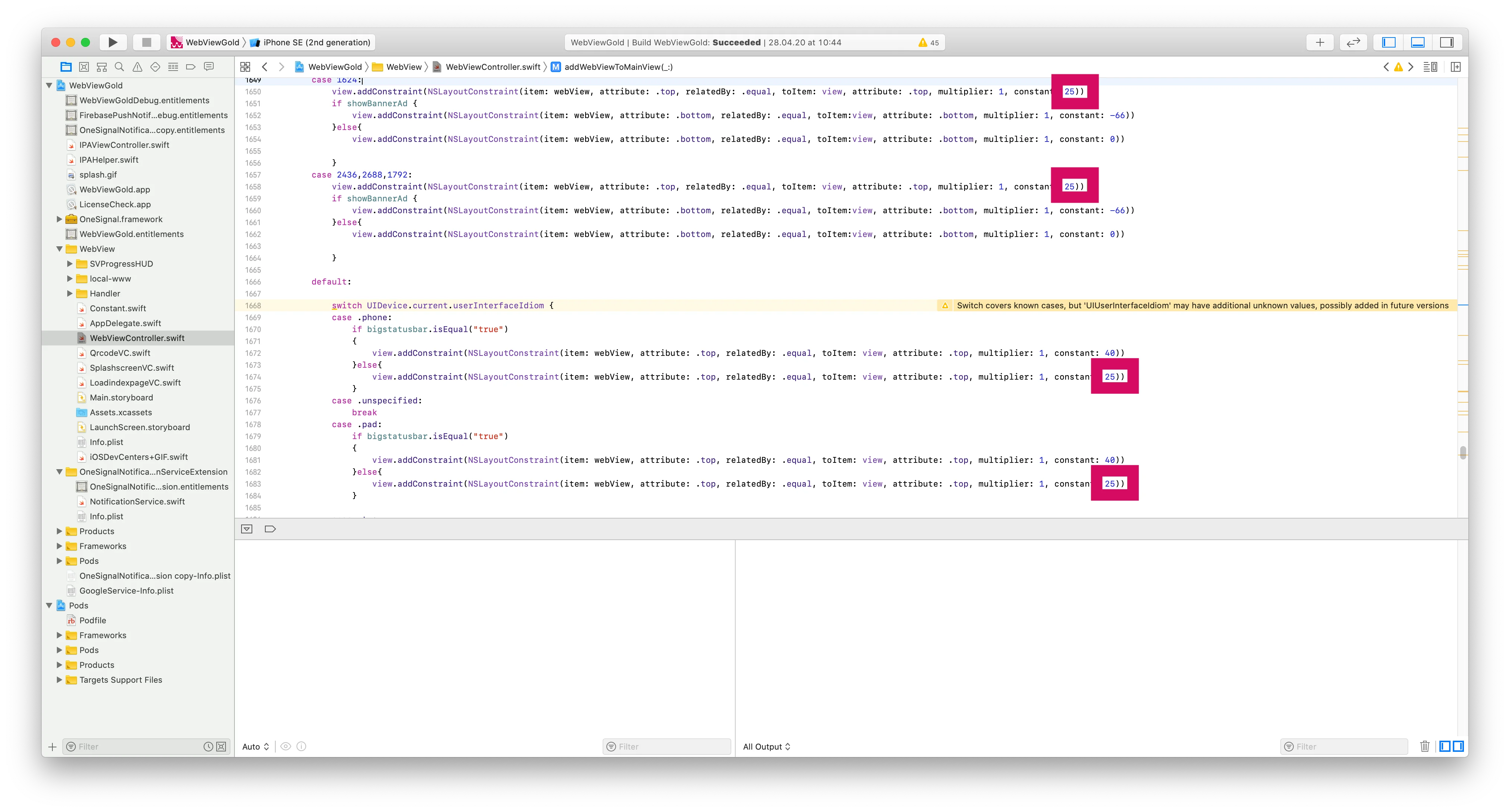
Resize the Safe Area on iPhone X/XS/XS Max WebView apps

SDK-style implementation notes

Treat this feature as a native capability exposed to your web layer: keep your production website or PWA as the source of truth, then use the documented WebViewGold configuration flags, URL commands, and JavaScript bridge calls to opt in to native iOS behavior only where it adds value. This approach keeps your codebase maintainable because the same web application can serve browsers, WebViewGold for iOS, and the other WebViewGold platforms with minimal conditional logic.

For reliable results, prefer HTTPS endpoints, stable route names, explicit success/error states in your UI, and small JavaScript helper functions that wrap native calls. For example, a web app built with jQuery Mobile, Lovable, Base44, Bolt, WordPress, Bubble, a custom React/Vue/Angular stack, or static HTML can expose a single button or event handler that triggers the native WebViewGold API while still showing a graceful browser fallback.

  • Recommended integration pattern: detect the app context, call the WebViewGold API, then update your web UI after the native callback or route change.
  • Testing checklist: validate the feature on a real device or packaged build, verify permissions and store review text, and confirm that browser-only users still receive a useful fallback.
  • SEO benefit: keep feature pages, route titles, and structured content indexable on your website while WebViewGold delivers the native app shell for iOS users.

Too busy? We set up your app for you.

Our team configures, builds & submits your WebViewGold app — done-for-you, fast turnaround, Made in Germany.

Get your app set up →

Build in your browser

No Mac, no IDE: the WebViewGold Cloud Builder configures, builds & uploads your app online.

Discover Cloud Builder →