
Biometric Authentication API (Face ID / Touch ID)
Protect your iOS app with Face ID or Touch ID and verify users biometrically from your web app.
This is an independent, more powerful, yet more complicated alternative to our simple Config.swift-based enableBioMetricAuth option. This API allows you to use biometric authentication in your app and return result via JavaScript to your website. Biometric authentication includes Face ID (in newer iPhone designs) and Touch ID (in older iPhone designs) with code as fallback. By calling the "bioauth://" URL command, you can trigger the biometric authentication natively in your app. Once the process is complete, WebViewGold will report the results back to your web app by calling one of the following functions:
- onBioAuthSuccess()
- Called when the authentication process was successful.
- onBioAuthFailure(errorCode, errorMessage)
- Called when the authentication process fails and provides error information.
- onBioAuthUnavailable()
- Called when biometric authentication is found to be unavailable on the device.
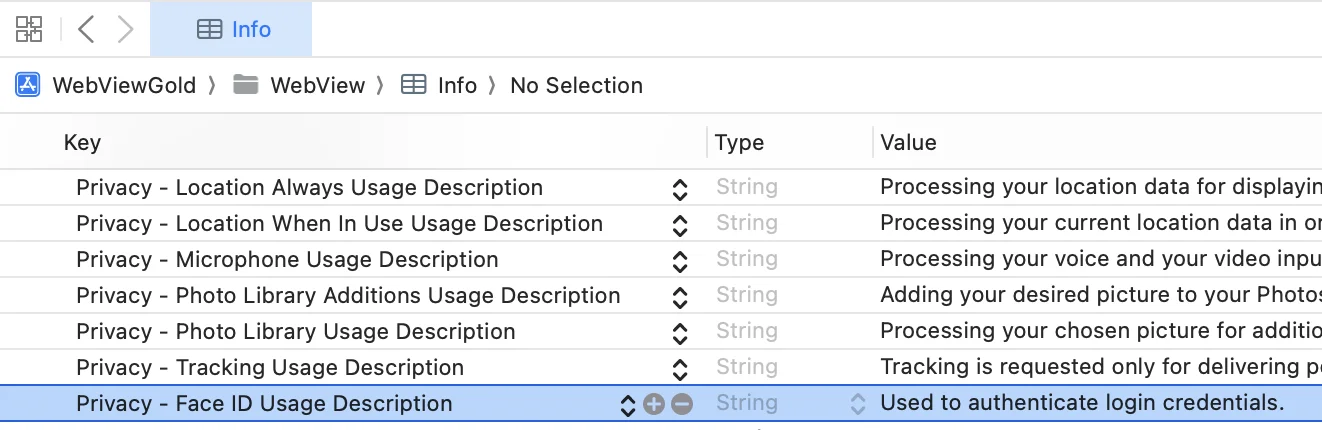
To use this API, first, you must add the privacy key for Face ID biometric authentication in your Info.plist file. This is done by opening Info.plist, hovering over an exisiting key, clicking the (+) symbol to add a new key below your currently selected one and selecting the "Privacy - Face ID Usage Description" key option. Without this key, the app will not support Face ID. The value for this key is a description that is presented to the user the first time your app attempts to use Face ID. This description should clearly explain why your app needs to use Face ID. See below for an example description for this key:
Next, you must define the following functions (in JavaScript) in your web app to handle the results of a biometric authentication:
<script>

function onBioAuthSuccess() {
    alert("Bio Authentication Succeeded");
}

function onBioAuthFailure(errorCode, errorMessage) {
    // errorCode = Int, errorMessage = String
    alert(`Bio Authentication Failed, ${errorMessage} (code ${errorCode})`);
}

function onBioAuthUnavailable() {
    alert("Bio Authentication Unavailable");
}

</script>
Then, load this kind of URL to trigger the biometric authentication process in your web app:<script> window.location.href = "bioauth://"; </script>
Security Notice: It should be noted that malicious users may be able to cause the onBioAuthSuccess() function to be called without completing the authentication process. Since authentication is a sensitive process, it is recommended to add an extra layer of security in your web app, such as a cookie or geolocation check, to help ensure the integrity of the authentication. Please consult your website cybersecurity expert for tailored guidance for your web app's needs.